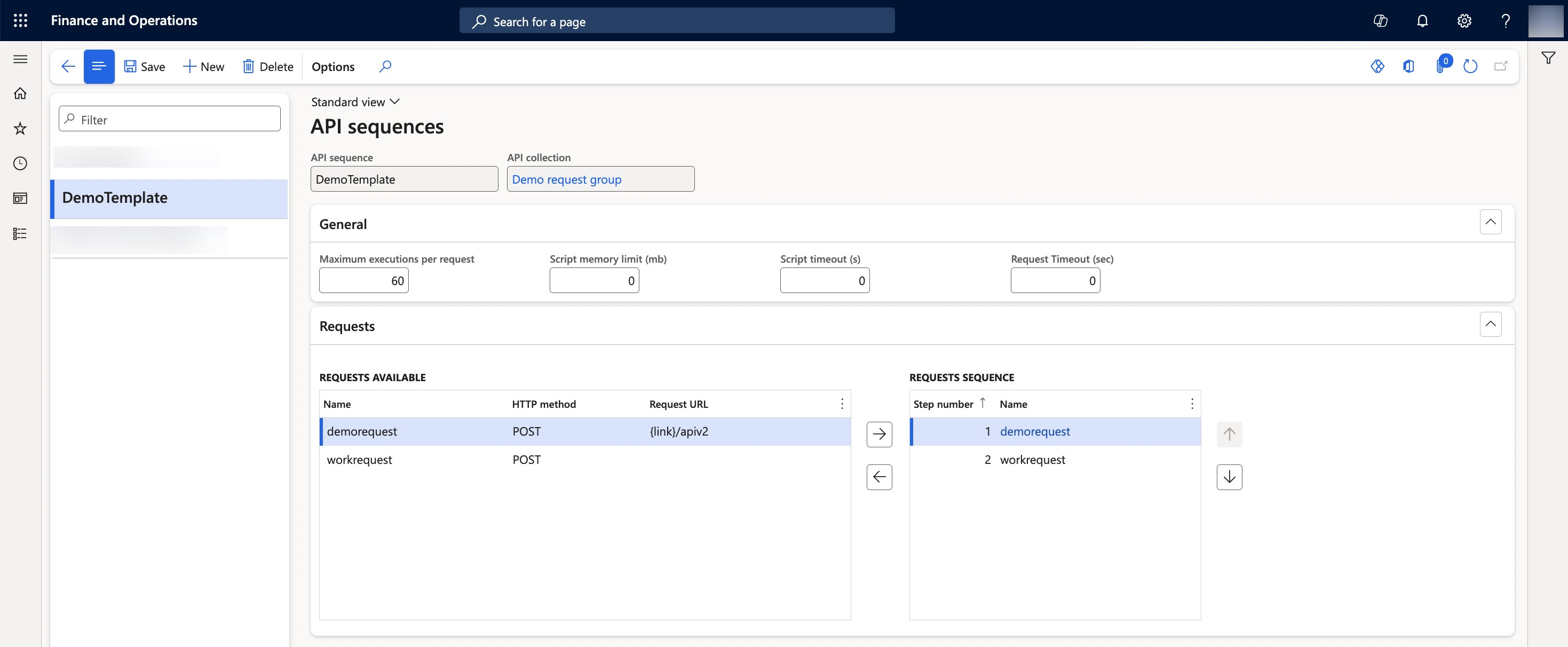
Create an API sequence
To create a new API sequence:
- In the Finance and Operations, expand the Modules and select Outbridge.
- From the displayed menu, select Data integration > API requests > API sequences.
- On the displayed page, select New.
- In API sequence, specify the name for the new sequence.
- In API collection, select the collection whose requests the sequence will use.
- On the General tab, adjust the execution limits for this sequence if it needs different values from the ones in Outbridge parameters:
- Maximum executions per request—the maximum number of times each request executes, counting the first call and any repetitions a script directs. Zero executes no requests.
- Script memory limit (MB)—the maximum memory available to one script execution.
- Script timeout (s)—the maximum time allowed for one script execution.
- Request timeout (s)—the maximum time an individual request may take.
- Open the Requests tab. The Requests available grid lists the requests in the selected API collection, with their Request ID, HTTP method, and Request URL.
- Select a request and choose Add to sequence. It moves into the Requests Sequence grid with the next Step number. Use Remove from sequence to take one out again.
Note: The order of the steps determines the order in which the requests are executed. Use Move up and Move down to change it.
- Select Save.